Somewhere in your company, on a Tuesday morning, someone is copying numbers out of an email and pasting them into a spreadsheet. They have done it a couple of hundred times. They could do it half asleep, and some weeks they probably are.
That is the job worth automating. It is also the job nobody puts in a slide deck, because it’s small and dull and doesn’t sound like the future.
The slide deck version is not going well. Gartner expects more than 40 percent of agentic AI projects to be canceled by the end of 2027, blaming rising costs, unclear business value and thin risk controls. A widely cited MIT study of corporate generative AI pilots found that 95 percent of them produced no measurable effect on profit and loss, and the cause it settled on wasn’t weak models. It was that the tools never made it into the work they were bought to change.
Which is why the useful version of AI for business automation looks nothing like the pitch. It works when you aim it at one repetitive process that already has a number attached to it. It stalls when you buy a platform first and then go looking for something to do with it.
What AI for business automation actually means in 2026
The phrase covers three different things, and mixing them up is where most of the money gets wasted.
Layer one: plain rules
When a form is submitted, create a row, send a message, tag the record. No AI involved. This is what Zapier, Make and Power Automate were doing years before anyone said “agent”, and it still handles the majority of what businesses actually automate.
It’s boring, it’s cheap, and it almost never breaks in surprising ways. If your process can be written as a flowchart with no judgment calls in it, you don’t need a model at all.
Layer two: an AI step inside a rule
Here the flow is still rules driven, but one step in the middle asks a model to do something a rule can’t: read the PDF, pull out the invoice number, sort the message into one of five buckets, draft a reply for a person to approve.
This is the layer where most real value sits right now. The workflow is still predictable end to end, and the model only has to be right about one small thing.
Layer three: an agent
You give a model a goal, a set of tools and permission to decide the steps itself. Reconcile these accounts. Chase the overdue invoices. Research these forty companies and fill in the sheet.
That’s the layer the industry is excited about and the layer Gartner is warning about. It’s genuinely useful for open ended research and messy inbox work. It’s a poor fit for anything where a wrong step is expensive and nobody is watching. If the distinction is new to you, our guide to what agentic AI actually is covers it in more depth.

Why so many of these projects quietly die
McKinsey’s 2026 global AI survey lands on a number that should be on a poster in every boardroom. Around 80 percent of respondents say AI has improved their productivity, but only 37 percent report any positive effect on earnings, essentially flat on the year before.
People feel faster. The books don’t show it.
AI for business automation isn’t failing on the technology. It’s failing on the work around it.
The same survey points at what separates the companies that do see money. Roughly three quarters of the high performers had fundamentally redesigned the workflow around the AI, against about a quarter of everyone else. Bolting a model onto a process you never questioned tends to produce a slightly faster version of a process that was wrong to begin with.
There’s a second, less discussed killer: nothing fails loudly. A broken rule based automation throws an error. A model that misreads one field in forty invoices just carries on, and you find out at the end of the quarter. Every serious deployment needs a way to notice quiet wrongness, and most pilots don’t have one.
What the tools cost
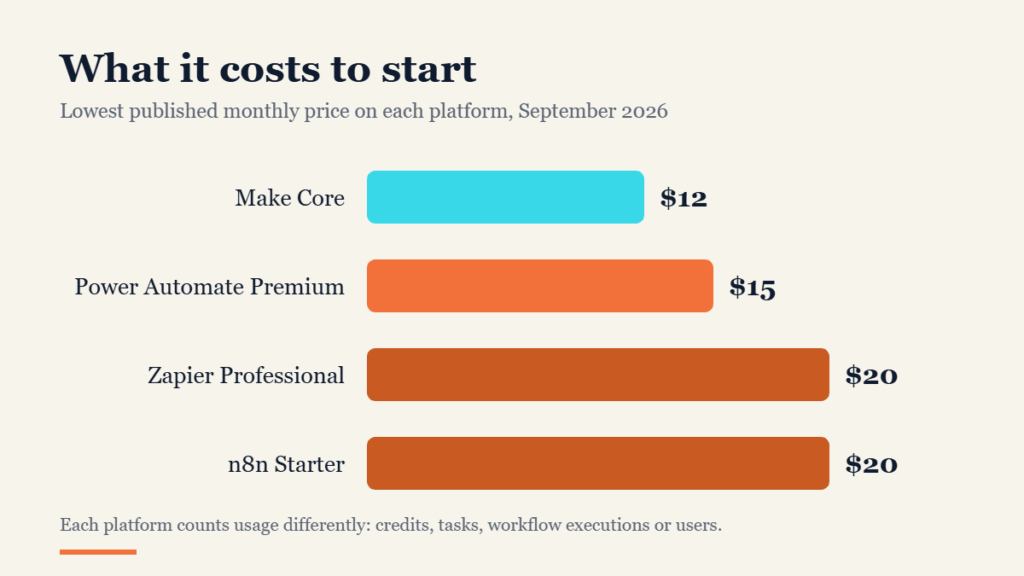
Entry prices are closer than the marketing suggests. The real difference is what each platform counts as one unit of usage, because that’s what decides your bill at volume, not the sticker price.
| Platform | What you pay for | Entry price | Best for |
|---|---|---|---|
| Zapier | Tasks (every action in a workflow) | Free for 100 tasks a month, Professional from $19.99 a month, Team from $69 | Non technical teams who want the widest app list and the least setup |
| Make | Credits (every module run) | Free for 1,000 credits a month, Core $12, Pro $21, Teams $38 at 10,000 credits | Visual builders and branching logic on a tighter budget |
| n8n | Workflow executions (the whole run counts once) | Free if you host it yourself, Starter $20 a month for 2,500 executions, Pro $50 for 10,000 | Technical teams and anything high volume or privacy sensitive |
| Microsoft Power Automate | Users, or bots for unattended runs | Premium $15 per user a month, Process $150 per bot, Hosted Process $215 per bot | Companies already living inside Microsoft 365 |
All prices read directly from each vendor’s own pricing page in September 2026.
Look at the unit column again, because that’s the whole game. A workflow with twenty steps processing five hundred records is one execution on n8n and a great many tasks on Zapier. For light use the difference is a rounding error. At real volume it’s the difference between a phone bill and a car payment.
Two costs sit outside that table and catch people out. Model usage is usually billed separately once your flows start calling AI steps in bulk. And someone has to maintain the thing when an app changes its API, which is real work that never appears on a pricing page.

The jobs worth automating first
Pick jobs that are high volume, low judgment, and already measured. If you can’t say how long the task takes today, you won’t be able to prove the automation helped.
Document intake
Invoices, receipts, delivery notes, signed forms. A model reads the document, pulls the fields, and drops them into your system with a person checking the exceptions. Accounts payable benchmarks widely put manual invoice handling in the region of fifteen dollars per invoice against a few dollars once it’s automated, and unlike most AI claims this one is easy to check against your own numbers.
Sorting and routing
Support tickets, inbound leads, job applications, internal requests. Classification is the thing language models are genuinely reliable at, the stakes of a misfile are low, and a wrong routing is cheap to fix.
Assembling the same report every week
Pull the numbers from three systems, write the standard summary, send it to the same six people every Monday. Nobody enjoys this task, and it’s identical every time.
The first draft of repetitive writing
Job descriptions, product copy variations, meeting summaries, the follow up email that says roughly the same thing in a slightly different order. Draft is the operative word. A person still signs it.
Smaller companies often get further with this than large ones, mostly because there’s nobody to negotiate with. We went through the pattern in more detail in how small teams automate the boring 40 percent.

The jobs to leave alone, at least for now
Automation goes wrong in predictable places, and all of them share one trait: the cost of a wrong answer is high and nobody is checking.
Leave alone anything where a mistake is expensive and irreversible. Payments going out, contracts being signed, anything touching payroll or personal data without a human in the loop.
Leave alone the emotional conversations. Klarna is the case study everyone points to, and for good reason. Its AI assistant took on the work of roughly 700 agents and the company publicly celebrated the savings, then its chief executive admitted the quality had slipped too far and started hiring humans back. The assistant still handles the bulk of routine chats. Humans took back the ones that needed judgment. That hybrid landing spot, not the original clean sweep, is the honest result.
Leave alone processes that change every month. Automation is an investment in stability. If the steps will be different in March, you’ll spend more time maintaining the flow than you ever saved.
And leave alone anything you can’t explain. If a regulator, an auditor or an angry customer asks why the system did what it did, “the model decided” is not an answer.
A start that actually survives contact with reality
The pattern that works is unglamorous and takes about a month.
Time the task before you automate it. Count how many times a week it happens and how long it takes. Two lines in a notebook is enough, and without that number you have no way to tell whether anything improved.
Write the steps out as a person does them today, including the exceptions. Most processes turn out to have three or four branches nobody documented, and those branches are where automations break.
Automate the boring middle first and leave the ends to people. Intake and final approval stay human. The copying, sorting and formatting in between goes to the machine.
Run both in parallel for two weeks. Let the automation do its thing while the person still does theirs, then compare the outputs. It feels wasteful and it’s the cheapest insurance you’ll ever buy.
Then measure the same number you measured at the start. If it didn’t move, kill the automation rather than defending it. A dead automation costs nothing. A half trusted one costs everybody’s attention forever.
Where all of this still trips up
Cost creep is the most common surprise. A flow that costs nothing in testing gets pointed at real volume and the invoice arrives with a different number of digits. Check the per unit price against your actual monthly volume before you commit, not after.
Permissions are the second. An automation with a service account often sees more than the person who set it up, and that’s how confidential data ends up in a shared channel. Give every flow the narrowest access it can function with.
Silent failure is the third and worst. Build in a check that something looks wrong: a count that should match, a total that should reconcile, a sample a person reviews each week. Put a human check on anything that leaves the building, meaning anything a customer, a regulator or a bank will see.
Finally, the skills gap is real but smaller than it looks. Most of these platforms are genuinely usable without code. The hard part has never been the software. It’s knowing your own process well enough to describe it accurately.
Key takeaways
- AI for business automation pays off on repetitive, measurable, low judgment work, and rarely on anything else.
- Around 80 percent of people say AI made them more productive, but only 37 percent of organizations see it in earnings, and redesigning the workflow is what separates the two groups.
- Entry pricing is similar across platforms. What varies is the unit: tasks, credits, executions or users, and that’s what decides your bill at volume.
- Start with document intake, routing and recurring reports. Keep humans on payments, judgment calls and emotional conversations.
- Time the task first, run the old way alongside the new for two weeks, and kill anything that doesn’t move the number.

Frequently asked questions
What is AI for business automation?
It’s using software to complete repetitive business tasks with a model handling the parts a fixed rule can’t, such as reading a document, classifying a request or drafting text. In practice most working systems are ordinary rule based workflows with one or two AI steps inside them.
Can AI automation replace employees?
It replaces tasks far more reliably than it replaces roles. The companies that swapped whole teams for a bot have mostly walked it back, Klarna most publicly. The realistic outcome is that the dull half of several jobs disappears and the people move onto the half that needed a person anyway.
How much does it cost to automate a business process?
The platform is the cheap part. Expect somewhere between $12 and $20 a month to start on Zapier, Make or n8n, or $15 per user on Power Automate, plus model usage once your flows get busy. The bigger cost is the time to map the process properly, usually a few days of someone’s attention per workflow.
Do I need to know how to code?
No, for the majority of what most businesses need. All four platforms above are built for people who don’t code. You’ll hit the ceiling once you need custom logic or heavy volume, and that’s the point where self hosted n8n or a developer starts making sense.
What should a small business automate first?
Whatever your team complains about most on a Monday. That’s usually chasing information between systems: copying orders into accounts, sorting the shared inbox, or rebuilding the same weekly report. Our no hype starter guide for small businesses works through the options.
The bottom line
The companies getting real money out of this aren’t the ones with the most ambitious plans. They’re the ones who found a genuinely tedious process, measured it, automated the middle of it and left a person at both ends.
Pick the task that makes someone sigh on a Tuesday. Start there. Once you’ve proved that one works, the next five are much easier arguments to win, and you’ll have a number to win them with.
For the wider picture on where AI spending is actually landing, see how many businesses actually use AI, or Gartner’s own forecast on agentic AI cancellations.
General information only, not legal, financial or professional advice. Prices and vendor plans were verified on 15 September 2026 and change often, so check the vendor’s own pricing page before you buy.