Somebody in finance pulls the company card statements and finds four separate AI subscriptions. One in operations. Two in marketing. One nobody can account for at all. None went through IT, and every one has been handling company documents for months.
That’s how most companies actually arrive at this decision. Not through a tidy procurement process, but through a mess that already exists and finally needs a real answer.
Here’s what makes the shopping hard. The phrase AI assistant for business covers at least three different kinds of product at wildly different prices, and vendor pages do almost nothing to separate them. Work out which of the three you’re buying and the choice gets much smaller, much faster.

What an AI assistant for business actually means
Strip away the marketing and there are three layers stacked under one name. Most confusion in this category comes from comparing a product on one layer against a product on another.
Layer one: a chatbot with a company login
The bottom layer is the chatbot you already know, wrapped in an admin console. Single sign on, a workspace your admin controls, audit trails, and a written promise that your prompts aren’t used to train the model.
It doesn’t know anything about your company. You still paste in the context yourself. What you’re buying is governance, plus the ability to stop paying for eleven personal subscriptions scattered across the org chart. For plenty of small companies, that alone is enough.
Layer two: an assistant that can reach your files
The middle layer connects to where your work already sits. Ask about last quarter’s renewal terms and it reads the contract instead of guessing.
This is where the value jumps, and where the risk does. An assistant that can search everything an employee can search will cheerfully surface a salary spreadsheet somebody overshared three years ago. The better products inherit your existing file permissions rather than inventing new ones, which means your file permissions quietly become your AI permissions. Most companies have never audited them.
Layer three: an assistant that can act
The top layer does things. Drafts the reply and sends it. Builds the spreadsheet. Moves the file. Runs a task overnight while nobody’s watching. It’s real now, but young, and it’s where an approval step stops being paperwork and starts being the thing that saves you. More on that in our guide to what agentic AI actually is.
The question that actually decides this
Before you open a feature chart, answer one question: where do your documents already live?
If everything sits in Microsoft 365, the assistant that reads SharePoint without a connector has a structural head start. If you run on Google Workspace, that logic runs the other way. If your company’s memory is a wiki, that wiki’s own AI knows more about you than any general assistant will. It’s the pattern behind how many businesses actually use AI: the tool that wins is the one already sitting where the work is.
Feature parity across these six is much closer than the marketing suggests. Integration depth is not. That gap is the real difference, and it’s the part a demo never shows you.
The six picks at a glance
| Tool | Best for | Entry price per user each month | Reaches your company files |
|---|---|---|---|
| ChatGPT Business | Strongest general assistant with real governance | $20 billed annually, $25 monthly | Yes, through connected apps |
| Claude Team | Long documents and technical teams | $20 billed annually, $25 monthly | Yes, through workspace connectors |
| Microsoft 365 Copilot | Companies already living in Office | $18 for smaller companies, $30 as an enterprise add on | Yes, natively |
| Gemini in Google Workspace | Companies already living in Google | From $7, bundled into the plan | Yes, natively |
| Perplexity Enterprise Pro | Research and anything needing sources | $40 monthly, or $400 a year | Partly, plus the open web |
| Notion Business | Teams whose knowledge lives in Notion | $20 billed annually | Yes, inside Notion |

The six picks, one at a time
ChatGPT Business
The default answer, and a defensible one. It’s $20 per user each month billed annually, or $25 monthly, with a two seat minimum. OpenAI cut that by $5 a seat in April 2026, so older comparison articles quote it too high.
Business data isn’t used for training. Connectors were renamed apps in December 2025 and now need admin approval per action. Company knowledge searches connected sources while respecting each user’s existing permissions. Heavy users can move to Premium seats at $100 annually or $125 monthly, which raise usage roughly fivefold and remove the five hour cap.
Verdict: the safest first purchase if you aren’t deeply committed to Microsoft or Google. Broadest capability, widest pool of people who already know how to use it. Where it trips up: budget for a mixed seat plan, because the jump to Premium for power users isn’t trivial.
Claude Team
Same headline price: $20 per seat billed annually, $25 monthly. The minimum came down to two seats and the plan caps around 150, so it’s built for small and midsize teams rather than a whole enterprise.
Every seat includes a 200,000 token context window and Claude Code. Connectors cover Drive, Gmail, Calendar, GitHub, Microsoft 365 and Slack, and since August 2026 they can send and forward Gmail as well as share, move and trash Drive files. Premium seats run $100 annually or $125 monthly at roughly six times the usage.
Verdict: pick this if your people live in long documents. Contracts, research, codebases, hundred page reports. That context window is a practical advantage, not a spec sheet number. Where it trips up: the 150 seat ceiling means a growing company migrates to Enterprise eventually, where pricing turns consumption based.
Microsoft 365 Copilot
The one whose price is most often misread. The enterprise version is $30 per user each month on top of a qualifying Microsoft 365 licence, so the true cost is base plus add on.
Companies under 300 users get Microsoft 365 Copilot Business instead, listed at $21 and currently selling at $18 paid yearly on Microsoft’s own pricing page. Bundles exist too: Business Standard with Copilot at $23.50, Business Premium with Copilot at $32.
There’s also a free tier called Copilot Chat. It’s grounded in the web and can’t reach your internal company data. That distinction is the most common misunderstanding in this category, and it’s why teams decide Copilot doesn’t work before they’ve bought it.
Verdict: if your company genuinely runs on Outlook, Teams, SharePoint and Excel, nothing reaches your work with less setup. The integration is the product. Where it trips up: quality depends on how organised your tenant already is. Messy SharePoint in, messy answers out.
Gemini in Google Workspace
Google retired the standalone Gemini add ons in early 2025 and folded the AI into Workspace itself, lifting base plan prices roughly 17 to 22 percent. On annual billing that’s about $7 per user each month for Business Starter, $14 for Standard and $22 for Plus.
There’s no separate AI line item to approve, which is either the best or the worst thing about it depending on whether your people use it. Note that Gemini Enterprise is a different product with a confusingly similar name. Previously called Agentspace, it starts near $21 a seat and adds consumption charges past the included quota.
Verdict: the obvious answer for Google Workspace companies, and the only entry here you might already be paying for without realising it. Check your plan before buying anything else. Where it trips up: Starter’s Gemini access is thinner than Standard and Plus.
Perplexity Enterprise Pro
The odd one out, and the one most likely to be a second subscription rather than a first. It’s $40 per seat monthly, or $400 a year, which works out near $33 a month. Education and nonprofits pay $30 or $300, and Enterprise Max runs $325.
This isn’t a general office assistant and doesn’t pretend to be. It’s a research tool that shows where every claim came from, which matters for competitive analysis, procurement, and anything a lawyer will eventually read.
Verdict: buy it for the handful of people whose job is finding things out. Buying it for everyone is money set on fire. Where it trips up: the highest entry price here paired with the narrowest use case.
Notion Business
Notion retired its separate AI add on and folded the whole suite into the Business plan at $20 per member each month. Free and Plus users get a limited trial rather than the real thing. What you get is an assistant that knows your wiki, project docs and meeting notes, because it’s all in one place.
Verdict: only makes sense if Notion is already your company’s memory. If it is, it’s the cheapest real answer here, because you were paying for Notion anyway. Where it trips up: outside Notion its reach is limited, so it sits alongside a general assistant rather than replacing one.
What you’ll actually pay
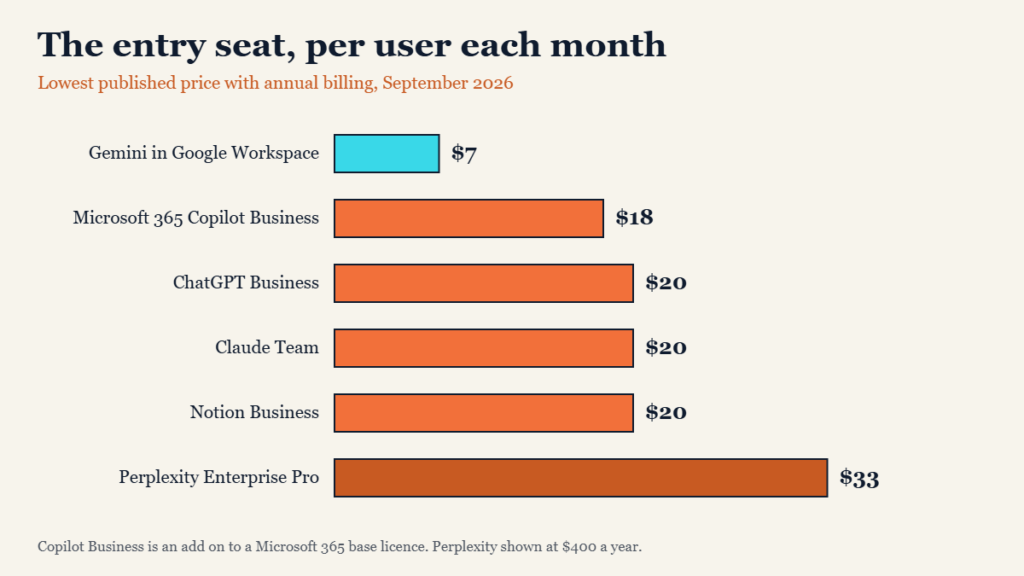
Entry prices cluster far more tightly than the feature marketing does. Five of the six sit between $7 and $20 a seat on annual billing. Only Perplexity breaks the pattern, and it’s solving a different problem. Three things hide behind those numbers, and all three push the real figure up.
- The base licence. Copilot’s $30 enterprise price is an add on. On Microsoft 365 E3 with Teams the all in figure lands nearer $69 a seat, and on E5 nearer $90.
- Premium seats. Both ChatGPT and Claude sell a higher usage tier at $100 to $125. Your three heaviest users will want one, and they’ll be right.
- The second subscription. Almost nobody ends up with exactly one of these. A general assistant plus a research tool is the common shape.
For a twenty person company, plan on $400 to $700 a month once you allow for a couple of Premium seats. Anyone quoting a flat twenty dollars times headcount is quoting the brochure.
How to pick without a six month evaluation
Four steps, in this order. The whole thing takes about two weeks.
- Start with where your files live. This eliminates three or four options immediately and costs you nothing.
- Audit your permissions before you connect anything. Pick the five most sensitive folders in your company and check who can actually open them. Do this first, not after somebody surfaces the payroll file in a chat window.
- Buy for ten people, not everyone. Choose the ten already using AI on their own accounts. They’ll produce a real answer in a fortnight instead of a polite shrug in six months.
- Test one real recurring task. Take the report somebody dreads writing every Friday and run it through each shortlisted tool with your actual data.
The winner is usually obvious by week two, and it’s rarely the one with the best feature chart. For the wider stack, see our guide to AI software for small business.

Where all of them still trip up
All six share the same four weaknesses, and no vendor page mentions any of them.
Confidence without accuracy
Every one will state something wrong in exactly the same tone it uses for something right. In a business context that isn’t a quirk, it’s a review requirement. Anything going to a customer, a regulator or a court gets human eyes first.
Permissions inherited from a mess
These tools respect your existing access controls faithfully, which is only reassuring if those controls were ever correct.
Adoption, not capability
The most common failure isn’t a bad tool. It’s forty licences and nine people logging in. Fewer seats with proper training beats a company wide rollout nobody was shown how to use.
Agents that still need supervision
The acting layer is genuinely useful and genuinely immature. Keep approval steps on anything that sends, deletes or spends until you’ve watched it for a month.
Key takeaways
- An AI assistant for business comes in three layers: a governed chatbot, one that reads your files, and one that acts. Know which you’re buying.
- Where your documents already live decides this more than any feature comparison does.
- Entry pricing is tight. Five of the six sit between $7 and $20 per user each month on annual billing.
- Copilot’s $30 is an add on to a base licence, not a total. Gemini may already be included in what you pay Google.
- Your file permissions become your AI permissions the moment you connect anything. Audit them first.
- Ten trained users beat forty untrained licences every time.

Frequently asked questions
What is the best AI assistant for business?
There isn’t one winner, and any article claiming otherwise is guessing about your company. On Microsoft 365, it’s Copilot. On Google Workspace, it’s Gemini, which you may already own. On neither, ChatGPT Business and Claude Team are the strongest general picks at the same $20 annual price.
Is the free or consumer version good enough?
For an individual, often yes. For a company, no. Business plans exist for three reasons: your data isn’t used for training, an admin can see and control what’s happening, and you get the connectors that let the assistant reach company files. Free tiers give you none of that.
Will our data be used to train the model?
On the business and enterprise tiers of all six, no. That’s standard across the category now. On free and personal tiers it varies by vendor and setting, which is precisely why shadow subscriptions on personal accounts are the real risk.
Can these assistants read our SharePoint or Google Drive?
Yes, on paid business plans. Copilot and Gemini reach their own apps natively. ChatGPT and Claude connect to both through connectors an admin approves. In every case the assistant sees only what that user could already open.
How much should a small business budget?
Plan on $20 to $25 per person each month, plus a couple of Premium seats at $100 or more for heavy users. A ten person company lands around $250 to $400 monthly. Start with a pilot group and grow into it rather than licensing everyone on day one.
The bottom line
Choosing an AI assistant for business feels like a features decision and almost never is. The tools have converged. What hasn’t converged is how deeply each one reaches into the place your company already keeps its work.
So skip the comparison spreadsheet. Answer the file question, audit your permissions, buy ten seats, and test one task somebody hates doing. You’ll have a real answer before most companies have finished scheduling their first vendor call.
All pricing was verified from vendor pricing pages on 2 September 2026 and changes often. This article is general information, not legal, financial or professional advice. Confirm current pricing and terms with each vendor before you buy, and check your own contractual and regulatory obligations before connecting an AI assistant to company data.