Ask a product manager what AI has done for them and you tend to get two answers in the same breath. The drafting got faster. The deciding did not.
That gap shows up in the research. Productboard worked with the independent firm UserEvidence to survey 379 product professionals at companies of 500 or more employees. Every team surveyed was already using AI tools. Not 99 percent. All of them. Ninety six percent used it consistently, and 94% used it daily or often.
So the interesting question stopped being whether to use AI. It’s which tools earn a line in your budget, and which ones are just another tab you forget to close.
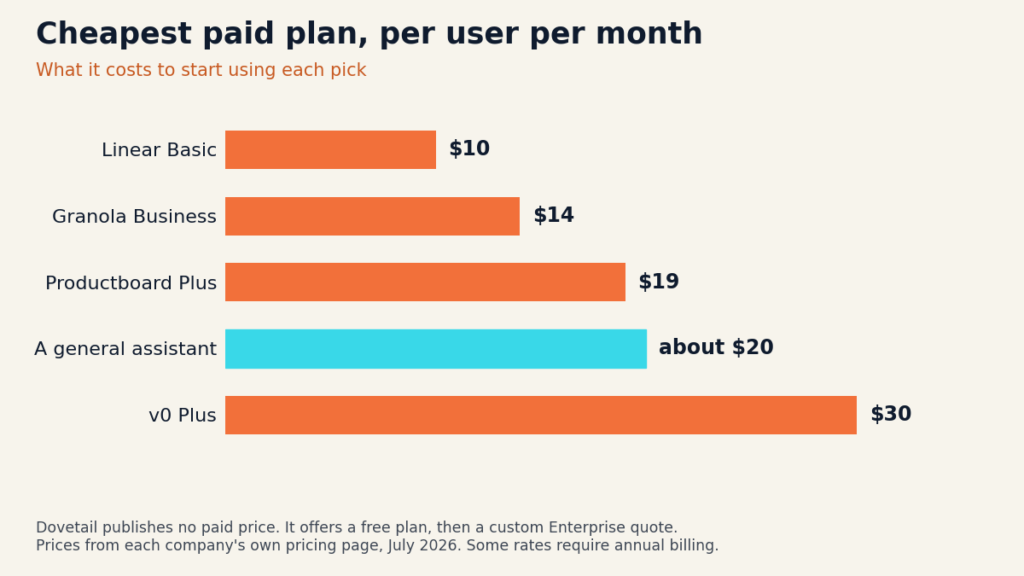
This roundup sorts the best AI tools for product managers by the job you’re actually hiring them to do: understanding customers, deciding what’s next, writing it down, showing it to someone, and getting it shipped. Prices were checked against each company’s own pricing page in July 2026. They move, so look before you buy.
Best AI tools for product managers at a glance
| Tool | Best for | Free option | Lowest paid plan |
|---|---|---|---|
| A general AI assistant | Drafting specs, thinking out loud | Yes, capable free tiers | About $20 a month |
| Productboard | Turning feedback into a roadmap | Yes, 50 AI credits a month | $19 per maker a month, annual |
| Dovetail | Making sense of customer research | Yes, one project, one channel | No public price, quote only |
| Granola | Meeting notes with no bot in the call | Yes, limited history | $14 per user a month |
| Linear | Triage and delivery | Yes, 250 issues, 2 teams | $10 per user a month, yearly |
| v0 by Vercel | Clickable prototypes | Yes, $5 of credits a month | $30 per user a month |
How we picked
Every pick is something a product manager can start using this week without a procurement cycle, and every one has a free tier or a published price you can read yourself. We sorted by job rather than category, because that’s how you actually buy. You buy when something specific is broken.

The tools, reviewed
1. A general AI assistant, for drafting and thinking
Before you buy anything PM specific, get good at the thing you already have open. ChatGPT, Claude, and Gemini all run capable free tiers, and the paid consumer plans sit around $20 a month. ChatGPT Business runs $20 per seat annually or $25 monthly with a two seat minimum, and unlike the consumer tiers it doesn’t train on your data.
The survey found the biggest time savings clustered in exactly this work: making presentations, writing PRDs, competitive research, and building roadmaps. Respondents reported saving an average of four hours per task, roughly 33 hours across their core functions. Mark Poole, a senior product manager at Turnitin quoted in that report, put it plainly: AI takes the paperwork, the ticket wrangling and the prioritizing, so the hard calls get the time instead.
Verdict: start here, and don’t skip it because it feels too obvious. Watch for confidently invented numbers in competitive research, which is the failure mode that bites PMs hardest. If any of the jargon is unfamiliar, our plain English AI glossary covers it. [Matt: add your hands on screenshot/verdict here before publishing]
2. Productboard, for turning feedback into a roadmap
Productboard is the feedback repository that grew an AI agent on top, called Spark. The pitch is context: it already holds your customer notes, features, and roadmaps, so its AI answers from your product rather than the open web.
The free plan is more generous than most people assume. You get full Spark access, unlimited roadmaps and prioritization, 500 feedback notes, 25 contributors, and 50 AI credits a month. Plus is $19 per maker a month billed annually and raises you to 250 credits. Business is $59 per maker a month billed annually with a two maker minimum and 500 credits, and it comes with a 14 day trial.
The credits are the part to read twice. Analyzing 100 feedback items runs roughly 30 to 50 credits, and generating a full specification can burn 50 to 200. On the free plan’s 50 credits, one good spec can empty your month. Top ups are $5 for 50 credits monthly, or $60 a year for 600.
Verdict: the strongest option if your real problem is that customer feedback lives in six places and nobody can say why a feature is on the roadmap. Note that pricing counts makers, not everyone, so engineers and support folks join as free contributors. [Matt: add your hands on screenshot/verdict here before publishing]
3. Dovetail, for making sense of research
Dovetail eats interview recordings, support tickets, survey responses, and app reviews, then clusters them into themes you can search and quote. For a PM drowning in qualitative data, it does the tedious part: tagging, summarizing, and finding the moment three customers said the same thing in different words.
Here’s the awkward bit. As of July 2026 Dovetail publishes exactly two plans: Free, and Enterprise with custom pricing. The old per seat middle tiers are gone from the pricing page. Free gets you one project, one channel, AI chat, and AI summaries, no card required. After that you’re on a sales call.
Verdict: worth running on your next round of interviews, and the fastest way to learn whether this category helps you at all. Just know that budget planning means talking to sales. [Matt: add your hands on screenshot/verdict here before publishing]
4. Granola, for meeting notes
Granola takes a different line from most notetakers: no bot joins your call. It listens through your laptop, blends what it hears with the rough notes you typed yourself, and hands back something that reads like you wrote it on a good day. For PMs in back to back calls, that matters, because nobody has to approve a robot attendee.
Basic is free with limited meeting history, and it still lets you opt out of model training at any time. Business is $14 per user a month and unlocks unlimited notes and history, advanced integrations with Notion, Slack, HubSpot and others, API access, and MCP so other AI tools can read your notes. Enterprise is $35 per user a month and adds single sign on, admin controls, and an org wide training opt out.
Verdict: the cheapest paid tool on this list and probably the fastest payback, because the alternative is you typing notes instead of listening. The free tier’s history cap is the upgrade trigger, and you’ll hit it. [Matt: add your hands on screenshot/verdict here before publishing]
5. Linear, for triage and delivery
Linear is where the roadmap turns into things engineers actually do. Its AI is pointed at the unglamorous middle: Triage Intelligence sorts incoming requests, Asks pulls intake out of Slack, and Insights answers questions about your own delivery data.
Free covers unlimited members, 2 teams, and 250 issues, plus the agent platform. Basic is $10 per user a month billed yearly for 5 teams and unlimited issues. Business is $16 per user a month billed yearly, and that’s the tier where the AI gets interesting: Triage Intelligence, Insights, Asks, private teams, and guests. Coding sessions run on separate AI credits.
Verdict: if your engineers already live in Linear, the Business upgrade is an easy argument. If they live in Jira, this is a much bigger conversation than a $16 seat. The 250 issue free cap is a trial, not a plan. Our roundup of AI tools for developers covers the rest of that stack. [Matt: add your hands on screenshot/verdict here before publishing]
6. v0 by Vercel, for prototypes
v0 turns a description into a working, clickable interface you can put in front of a stakeholder or a user. For a PM, the value isn’t the code. It’s ending the argument about what the thing looks like in twenty minutes instead of waiting two weeks for design time.
Free gives you $5 of credits a month and caps you at 7 messages a day. Plus is $30 per user a month with $30 of credits plus $2 of free daily credits. Business is $100 per user a month, and it’s the first tier where training opt out is on by default, which is the detail your security team will ask about. Enterprise adds SSO and a promise your data is never used for training.
Prototyping is the most fragmented category in the survey: 60% of teams use two different prototyping tools, with no clear leader. Try before you standardize.
Verdict: the most fun tool here and the easiest to overspend on, because credits vanish once you start iterating. Prototype, screenshot, decide, stop. [Matt: add your hands on screenshot/verdict here before publishing]
How to build a stack by budget
At $0: a free assistant, Productboard Free, Dovetail Free, Granola Basic, and Linear Free. That’s a real working stack. It runs out of room rather than features, which is the honest way a free tier should fail.
At about $35 a month: add a paid assistant seat and Granola Business. You’ve bought back the two things that eat a PM’s week, drafting and note taking, for less than a team lunch.
At about $70 a month: add Productboard Plus and Linear Basic. Now the feedback and the delivery are both real systems instead of a spreadsheet and hope.
Above that you’re into team plans, and the conversation shifts from your card to your CFO. Good moment to ask whether anyone is measuring the return. Only 40% of the teams surveyed tie AI to business outcomes like revenue. The rest are still counting hours saved.
The governance gap nobody puts in the budget
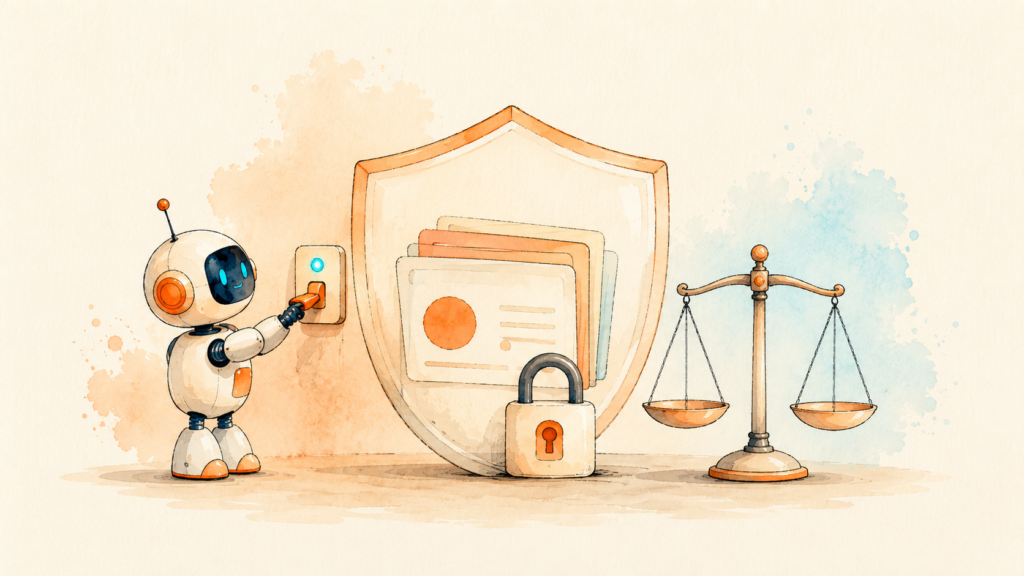
Here’s the finding from that survey that should give you pause. Every respondent used AI tools. Only 65% said their company had a documented AI policy. More than a third of product teams are feeding customer interviews, roadmaps, and unreleased strategy into tools under no written rules at all.
Fragmentation makes it worse. 88% of teams use two or more different AI models, so customer data ends up scattered across vendors nobody centrally approved. The cost of getting that wrong is documented: IBM’s 2025 Cost of a Data Breach Report put the average AI related breach at $4.46 million, and found 97% of the companies that had one lacked proper access controls.
You don’t need a policy committee. You need three answers about every tool on this list: does it train on your data, can you turn that off, and who else at your company can see what you paste in. The answers vary by tier, which is exactly why the cheap plan is sometimes the expensive choice.

Where these tools still fall short
They summarize beautifully and prioritize badly. Every tool here can tell you what your customers said. None can tell you which of those things is worth doing, because that depends on strategy, timing, and politics that exist nowhere in the data.
The survey backs this up in an uncomfortable way. When PMs were asked which skills are getting more important, the top four were data literacy at 58%, synthesizing customer insights at 54%, systems level thinking at 53%, and strategic thinking at 52%. Every one of those is a judgment skill. AI took the typing and raised the bar on the thinking.
Credit systems are the other quiet problem. Productboard, Linear, Notion, and v0 all meter AI usage now. The sticker price is the floor, not the cost, and heavy months cost more than light ones.
And a warning worth repeating: an AI summary of a customer interview is not evidence. It’s a compression of evidence, with the disagreements smoothed out. Go read the actual quotes before you bet a quarter on a theme.
Key takeaways
- Adoption is universal. Of 379 product professionals surveyed, every team used AI tools and 94% used them daily or often.
- Start with a general assistant. The biggest reported time savings are in PRDs, presentations, competitive research, and roadmaps.
- Buy for a broken job, not a category. Feedback chaos points to Productboard, meeting overload to Granola, delivery mess to Linear.
- The best AI tools for product managers all have a real free tier. Run the free stack for a month before you spend anything.
- Watch the credits. Metered AI means the listed seat price is the floor.
- Only 65% of teams have a written AI policy. Know what each tool does with your data before you paste in a customer interview.

Frequently asked questions
What are the best AI tools for product managers on a zero budget?
A free assistant like ChatGPT, Claude, or Gemini, plus Productboard Free for feedback and roadmaps, Dovetail Free for research, Granola Basic for meeting notes, and Linear Free for delivery. You’ll hit usage caps before you hit missing features, which is a fair trade while you work out what you actually need.
Will AI replace product managers?
Nothing in the current data points that way, but the job is moving. 98% of surveyed teams said they’ve changed or plan to change team structures because of AI, and the skills PMs named as rising are all judgment skills. The drafting is getting automated. The deciding is getting more valuable.
How many AI tools should a product manager actually use?
Two or three, chosen for specific pain. Fragmentation is already a documented problem: 88% of teams run two or more different AI models, and that scatter creates governance and context headaches. More tools rarely means more clarity.
Do these tools train their AI on my product data?
It depends on the tool and the tier, which is the frustrating answer. Granola lets you opt out on every plan including the free one. v0 turns training opt out on by default at Business and up. ChatGPT Business doesn’t train on your data, while the consumer tiers have their own settings. Read the AI terms for the specific plan you’re buying, not the company’s general privacy page.
What is an AI agent in a product tool?
An agent does multi step work on its own rather than answering one question at a time, like reading 200 feedback notes and drafting a spec from them. Productboard’s Spark and Linear’s agent platform are both examples. Our guide to agentic AI explains where these genuinely work and where the demos oversell.
This article is for general information only and is not professional, legal, or financial advice. Pricing and features were verified in July 2026 and change often. Check each provider’s own pricing and terms before you buy.